
On this page
Counter-Strike: Global Offensive is a game that allows players to customize various settings, including CS:GO crosshairs. And, therefore, anyone can tailor his or her experience to better suit the gaming style.
The same as regular players, pro CSGO players also use different options at their disposal to tweak their gameplay. As a result, many casual players try to copy their CSGO pro settings. So if you are someone who is looking to customize your gameplay experience and match your favorite celebrity player, then you should take a closer look at these CS:GO pro settings.
Below you’ll find the complete TOP 5 list of CS:GO pro settings popular in 2022.
Note (October 2026): these are the CS:GO configs these players used in 2022, kept here for reference. Counter-Strike 2 replaced CS:GO in September 2023, and not everything below carries over: -tickrate 128 no longer works (CS2 uses sub-tick servers), -novid isn’t needed, and cl_righthand was replaced by cl_prefer_lefthanded. The bob commands, viewmodel_recoil, the rate and interp commands, and video options such as Multicore Rendering and Uber Shaders also come from CS:GO and may not exist or have any effect in CS2. Most of these players have changed teams since then, too, so check their current CS2 configs before copying them.
Remember, if you want to trade CS2 skins, be sure to check out SkinsMonkey, where you will always get the best deals possible!
Denis “electroNic” Sharipov And His CS:GO Pro Settings
electroNic is one of the most prominent names on the professional CS:GO scene. His real name is Denis Sharipov. In 2022, he played for Natus Vincere. He has since played for Cloud9, Virtus.pro, and BC.Game, where HLTV lists him as benched as of October 2026. In 2022, his setup included: a Zowie XL2546K monitor, a Logitech G Pro X Superlight White along with a Logitech G Pro X Wireless headset and a Logitech G915 TKL white keyboard.

When it comes to hardware pro settings, electroNic used an AMD Ryzen 9 5950X processor and an AMD Radeon RX 6900 XT graphics card. Let’s take a closer look at electroNic’s CS:GO pro settings.
Mouse Settings:
- DPI – 400,
Sensitivity – 2.2 - eDPI – 880
- Zoom Sensitivity – 1.05
- Hz – 1000
- Windows Sensitivity – 6
- Raw Input – 1
- Mouse Acceleration – 0
Crosshair Settings:
cl_crosshair_drawoutline 0; cl_crosshairalpha 255; cl_crosshaircolor 2; cl_crosshaircolor_b 200; cl_crosshaircolor_g 255; cl_crosshaircolor_r 255; cl_crosshairdot 0; cl_crosshairgap -4; cl_crosshairsize 1; cl_crosshairstyle 4; cl_crosshairthickness 2; cl_crosshair_sniper_width 1;
Bob Settings:
cl_bob_lower_amt 5; cl_bobamt_lat 0.33; cl_bobamt_vert 0.14; cl_bobcycle 0.98;
Viewmodel Settings:
viewmodel_fov 68; viewmodel_offset_x 2.5; viewmodel_offset_y 0; viewmodel_offset_z -1.5; viewmodel_presetpos 3; cl_viewmodel_shift_left_amt 1.5; cl_viewmodel_shift_right_amt 0.75; viewmodel_recoil 0; cl_righthand 1;
Launch Options:
-novid -console -refresh 240 +cl_updaterate 128 +cl_cmdrate -tickrate 128 +rate 786432 -language en
Video Settings:
- Resolution – 1280×960
- Aspect Ratio – 4:3
- Scaling Mode – Stretched
- Color Mode – Computer Monitor
- Brightness – 110%
- Display Mode – Fullscreen
Advanced Video Settings:
- Global Shadow Quality – Very Low
- Model / Texture Detail – Low
- Texture Streaming – Disabled
- Effect Detail – Low
- Shader Detail – Low
- Boost Player Contrast – Enabled
- Multicore Rendering – Enabled
- Multisampling Anti-Aliasing Mode – None
- FXAA Anti-Aliasing – Disabled
- Texture Filtering Mode – Bilinear
- Wait for Vertical Sync – Disabled
- Motion Blur – Disabled
- Triple-Monitor Mode – Disabled
- Use Uber Shaders – Enabled
Got skins you don’t need? On SkinsMonkey, you can trade them for skins you’ll actually use, and if you’d rather have real money, you can sell CS2 skins on SkinCashier, our sister service.
S1mple – CS:GO Pro Settings
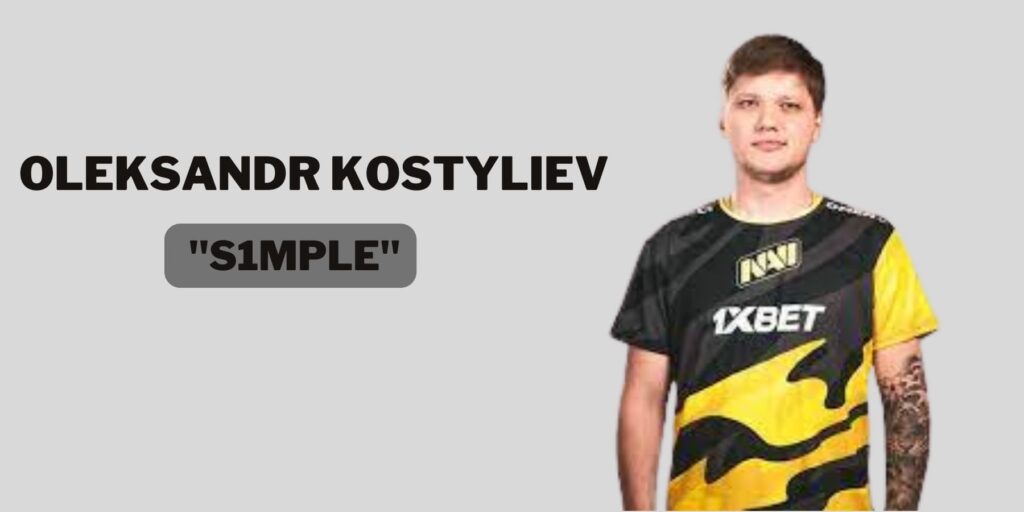
Oleksandr Kostyliev comes from Ukraine. s1mple is considered by many to be one of the best, if not the best, CS:GO player on the professional scene. In 2022, he played for Natus Vincere as the team’s AWPer; since July 2025, he has played for BC.Game. His 2022 gear list included a Zowie XL2546K monitor, a Logitech G Pro X Superlight Magenta mouse, and he uses the Logitech G Pro X headset.
Below you will find a detailed list of s1mple’s CS:GO settings:
Mouse Settings:
- DPI – 400,
- Sensitivity – 3.09
- eDPI – 1236
- Zoom Sensitivity – 1
- Hz – 1000
- Windows Sensitivity – 6
- Raw Input – 1
- Mouse Acceleration – 0
Crosshair Settings:
cl_crosshair_drawoutline 0; cl_crosshairalpha 255; cl_crosshaircolor 4; cl_crosshaircolor_b 255; cl_crosshaircolor_g 0; cl_crosshaircolor_r 255; cl_crosshairdot 0; cl_crosshairgap -3; cl_crosshairsize 2; cl_crosshairstyle 4; cl_crosshairthickness 0; cl_crosshair_sniper_width 1;
Bob Settings:
cl_bob_lower_amt 21; cl_bobamt_lat 0.33; cl_bobamt_vert 0.14; cl_bobcycle 0.98;
Viewmodel Settings:
viewmodel_fov 68; viewmodel_offset_x 2.5; viewmodel_offset_y 0; viewmodel_offset_z -1.5; viewmodel_presetpos 3; cl_viewmodel_shift_left_amt 1.5; cl_viewmodel_shift_right_amt 0.75; viewmodel_recoil 0; cl_righthand 1;
Launch Options:
-freq 240 -novid -console -tickrate 128 +fps_max 0
Video Settings:
- Resolution – 1280×960
- Aspect Ratio – 4:3
- Scaling Mode – Stretched
- Color Mode – Computer Monitor
- Brightness – 130%
- Display Mode – Fullscreen
Advanced Video Settings:
- Global Shadow Quality – Very Low
- Model / Texture Detail – Low
- Texture Streaming – Disabled
- Effect Detail – Low
- Shader Detail – Low
- Boost Player Contrast – Disabled
- Multicore Rendering – Enabled
- Multisampling Anti-Aliasing Mode – 8x MSAA
- FXAA Anti-Aliasing – Disabled
- Texture Filtering Mode – Bilinear
- Wait for Vertical Sync – Disabled
- Motion Blur – Disabled
- Triple-Monitor Mode – Disabled
- Use Uber Shaders – Enabled
Do you want to expand your CS2 inventory? Be sure to check out the giveaways at SkinsMonkey, where you can get free CS2 skins!
NiKo – CS:GO Pro Settings
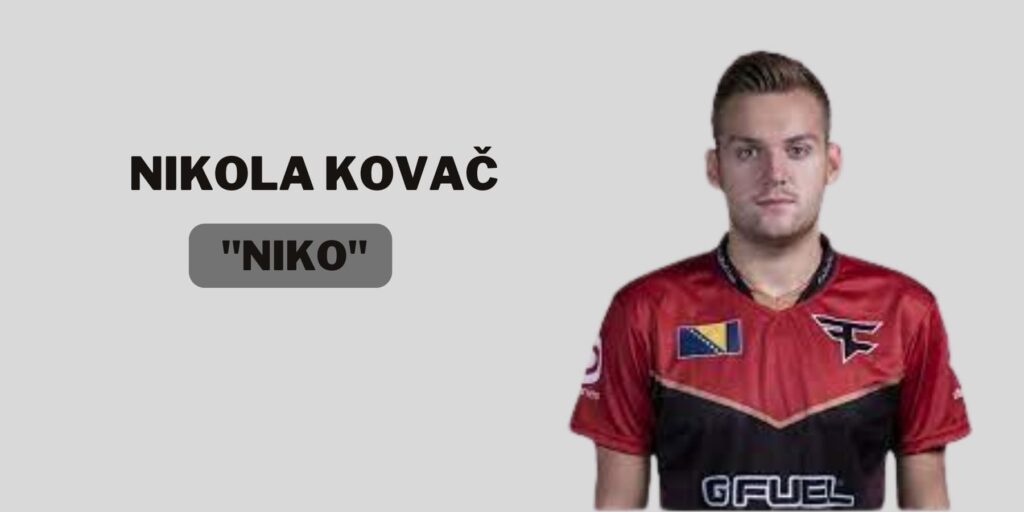
Nikola Kovač, better known as NiKo, comes from Bosnia and Herzegovina. He is considered one of the best professional players on the scene. In 2022, he played for G2 Esports as a rifler; he joined Team Falcons in January 2025. Nikola uses the same monitor as our previous entry, as well as a ZOWIE S2 mouse, Logitech G513 keyboard, and a Logitech G Pro Headset.
Mouse Settings:
- DPI – 400,
- Sensitivity – 1.51
- eDPI – 604
- Zoom Sensitivity – 0.9
- Hz – 1000
- Windows Sensitivity – 6
- Raw Input – 1
- Mouse Acceleration – 0
Crosshair Settings:
cl_crosshair_drawoutline 0; cl_crosshairalpha 255; cl_crosshaircolor 4; cl_crosshaircolor_b 144; cl_crosshaircolor_g 238; cl_crosshaircolor_r 0; cl_crosshairdot 0; cl_crosshairgap -3; cl_crosshairsize 1; cl_crosshairstyle 4; cl_crosshairthickness 1; cl_crosshair_sniper_width 1;
Bob Settings:
cl_bob_lower_amt 5; cl_bobamt_lat 0.33; cl_bobamt_vert 0.14; cl_bobcycle 0.98;
Viewmodel Settings:
viewmodel_fov 65; viewmodel_offset_x 2; viewmodel_offset_y 1.5; viewmodel_offset_z -1; viewmodel_presetpos 0; cl_viewmodel_shift_left_amt 1.5; cl_viewmodel_shift_right_amt 0.75; viewmodel_recoil 0; cl_righthand 1;
Launch Options:
-noforcemaccel -noforcemspd -noforcemparms -freq 240 -console -novid -tickrate 128
Video Settings:
- Resolution – 1280×960
- Aspect Ratio – 4:3
- Scaling Mode – Stretched
- Color Mode – Computer Monitor
- Brightness – 90%
- Display Mode – Fullscreen
Advanced Video Settings:
- Global Shadow Quality – Medium
- Model / Texture Detail – Low
- Texture Streaming – Disabled
- Effect Detail – Low
- Shader Detail – Low
- Boost Player Contrast – Enabled
- Multicore Rendering – Enabled
- Multisampling Anti-Aliasing Mode – 8x MSAA
- FXAA Anti-Aliasing – Disabled
- Texture Filtering Mode – Anisotropic 8x
- Wait for Vertical Sync – Disabled
- Motion Blur – Disabled
- Triple-Monitor Mode – Disabled
- Use Uber Shaders – Enabled
How does Kennys set his PC?
Kenny Schrub is a French professional CSGO player. His nickname in the community is kennyS. In 2022, he was signed to G2 Esports as an AWPer; he moved to Falcons in November 2022 and retired from competitive play in May 2023. Aside from using the same monitor as our previous entries, he also uses a Logitech MX518 mouse, a Logitech G513 keyboard, and a Logitech G Pro Wireless Headset.

Mouse Settings:
- DPI – 400,
- Sensitivity – 2.2
- eDPI – 880
- Zoom Sensitivity – 1
- Hz – 1000
- Windows Sensitivity – 6
- Raw Input – 1
- Mouse Acceleration – 0
Crosshair Settings:
cl_crosshair_drawoutline 1; cl_crosshairalpha 200; cl_crosshaircolor 1; cl_crosshaircolor_b 50; cl_crosshaircolor_g 250; cl_crosshaircolor_r 50; cl_crosshairdot 1; cl_crosshairgap -2; cl_crosshairsize 1; cl_crosshairstyle 4; cl_crosshairthickness 0.5; cl_crosshair_sniper_width 1;
Bob Settings:
cl_bob_lower_amt 5; cl_bobamt_lat 0.33; cl_bobamt_vert 0.14; cl_bobcycle 0.98;
Viewmodel Settings:
viewmodel_fov 68; viewmodel_offset_x 2; viewmodel_offset_y 2; viewmodel_offset_z -2; viewmodel_presetpos 0; cl_viewmodel_shift_left_amt 0.5; cl_viewmodel_shift_right_amt 0.25; viewmodel_recoil 1; cl_righthand 0;
Launch Options:
-console -novid -refresh 240
Video Settings:
- Resolution – 1024×768
- Aspect Ratio – 4:3
- Scaling Mode – Black Bars
- Color Mode – Computer Monitor
- Brightness – 80%
- Display Mode – Fullscreen
Advanced Video Settings:
- Global Shadow Quality – High
- Model / Texture Detail – Medium
- Texture Streaming – Disabled
- Effect Detail – Low
- Shader Detail – Low
- Boost Player Contrast – Enabled
- Multicore Rendering – Enabled
- Multisampling Anti-Aliasing Mode – None
- FXAA Anti-Aliasing – Disabled
- Texture Filtering Mode – Trilinear
- Wait for Vertical Sync – Disabled
- Motion Blur – Disabled
- Triple-Monitor Mode – Disabled
- Use Uber Shaders – Enabled
Valerii “B1t” Vakhovskyi – CS:GO Pro Setting & Configs
B1t is a player name very commonly known on the professional CSGO scene. Real name Valerii Vakhovskyi. He was born in 2003 in Ukraine. B1t is still a member of Natus Vincere (as of October 2026), where he plays as a rifler. B1t uses a standard Zowie XL2546 monitor and a Logitech G Pro X Superlight White mouse paired up with a Logitech G Pro X keyboard. In addition, his headset is a Logitech G Pro X Headset. And the mousepad he uses is ZOWIE G-SR.

Mouse Settings:
- DPI – 400,
- Sensitivity – 1.42
- eDPI – 568
- Zoom Sensitivity – 1
- Hz – 1000
- Windows Sensitivity – 6
- Raw Input – 1
- Mouse Acceleration – 0
Crosshair Settings:
cl_crosshair_drawoutline 0; cl_crosshairalpha 255; cl_crosshaircolor 4; cl_crosshaircolor_b 144; cl_crosshaircolor_g 238; cl_crosshaircolor_r 0; cl_crosshairdot 0; cl_crosshairgap -3; cl_crosshairsize 2; cl_crosshairstyle 4; cl_crosshairthickness 0; cl_crosshair_sniper_width 1;
Bob Settings:
cl_bob_lower_amt 5; cl_bobamt_lat 0.33; cl_bobamt_vert 0.14; cl_bobcycle 0.98;
Viewmodel Settings:
viewmodel_fov 68; viewmodel_offset_x 2.5; viewmodel_offset_y 0; viewmodel_offset_z -1.5; viewmodel_presetpos 3; cl_viewmodel_shift_left_amt 1.5; cl_viewmodel_shift_right_amt 0.75; viewmodel_recoil 0; cl_righthand 1;
Launch Options:
+fps_max 400 -freq 240 -console -tickrate 128 -novid -rate 786432 +cl_interp_ratio 1
Video Settings:
- Resolution – 1280×960
- Aspect Ratio – 4:3
- Scaling Mode – Stretched
- Color Mode – Computer Monitor
- Brightness – 118%
- Display Mode – Fullscreen
Advanced Video Settings:
- Global Shadow Quality – Low
- Model / Texture Detail – Low
- Texture Streaming – Disabled
- Effect Detail – Low
- Shader Detail – Medium
- Boost Player Contrast – Disabled
- Multicore Rendering – Enabled
- Multisampling Anti-Aliasing Mode – 8x MSAA
- FXAA Anti-Aliasing – Disabled
- Texture Filtering Mode – Bilinear
- Wait for Vertical Sync – Disabled
- Motion Blur – Disabled
- Triple-Monitor Mode – Disabled
- Use Uber Shaders – Disabled
Summary
This article covered some of the best professional CS:GO players of 2022 and the gear and hardware they used, along with the in-game settings they relied on in their CS:GO matches. For CS2, treat these configs as a starting point and check each player’s current settings.
Was this article helpful?One tap. It tells us what to update first.
Be the first to rate this article.
Thanks, noted. Alex reads these before every update.