

On this page
ZywOo plays CS2 on 400 DPI with an in-game sensitivity of 1.9, which works out to 760 eDPI, on a 4:3 stretched resolution. That is a low sensitivity, common among AWPers, who aim mostly with small corrections from a held angle. The numbers below are his publicly tracked settings as of October 25, 2026. Two values changed in September and October. His sensitivity went from 2.0 to 1.9 in September, and the tracked resolution changed from 1280×960 to 1024×768 in October. The second change is not confirmed by every listing, and we show both values below.
The crosshair changed for everyone in September. Valve moved crosshair values to real pixels in the Rush Hour update and changed the share code format twice, so most “ZywOo crosshair codes” you find online are conversions of his old settings, not codes he exported himself. We explain below how to copy his current crosshair from a match instead.
If you came for the skins, we checked his Steam inventory on October 27 and wrote it up in ZywOo’s CS2 inventory. Anything from it that you like is tradeable on SkinsMonkey.
Mouse and Sensitivity: 760 eDPI for an AWPer
| Setting | Value |
|---|---|
| DPI | 400 |
| In-game sensitivity | 1.9 (2.0 until September 2026) |
| eDPI | 760 |
| Zoom sensitivity | 1 |
| Polling rate | 1000 Hz |
| Windows sensitivity | 6 (December 2025 listing) |
| Raw input | On (December 2025 listing) |
| cm/360 | about 55 cm |
The step from 2.0 to 1.9 lowered his eDPI from 800 to 760, about five percent. You will hardly notice it with a rifle, but with the AWP small corrections become a bit easier to control. At 55 cm for a full turn, his setup needs a large mousepad. If your sensitivity is far from his, do not switch in one evening: move toward it in two or three steps and play Deathmatch at each step.
Video Settings: The Resolution Sources Disagree On
| Setting | Value |
|---|---|
| Resolution | 1024×768 (October 2026 listing), 1280×960 in earlier listings |
| Aspect ratio | 4:3 |
| Scaling mode | Stretched |
| Display mode | Fullscreen |
| Refresh rate | 600 Hz |
One tracked listing changed his resolution to 1024×768 around October 11. The value was taken from a crosshair code a viewer shared, because codes in the new format also store the screen height, and listings updated later in October still give 1280×960. We could not confirm either value from a match, so we show both. Both are 4:3 stretched, which makes player models look wider at the cost of a narrower field of view. His monitor is a ZOWIE XL2586X+ with a 600 Hz refresh rate, according to listings since April 2026. If you want the launch options that usually go with a 4:3 setup, our CS2 launch options guide covers them.
Crosshair: A Small Cyan Cross
| Setting | Value |
|---|---|
| Style | Static cross |
| Length | 2 |
| Thickness | 2 |
| Gap | 2 |
| Dot | Off |
| Outline | Off |
| Color | Cyan, R0 G233 B255 |
| Alpha | 255 |
These are the values in pixels after the September update, tracked as of October 25, 2026, for a screen height of 768. In the new system the crosshair looks the same at every resolution, but the numbers change with the resolution, so the same crosshair has different values at 1280×960. Older listings differ: one from June 2026 shows a thinner white cross with a negative gap. Our crosshair update breakdown explains what changed and why.
- Sep 22, 2026 Rush Hour update makes crosshairs resolution independent.
- Sep 23, 2026 Hotfix confirms length, thickness and gap are in pixels.
- Sep 30, 2026 Patch changes the share code format, codes now start with CS.
What this means in practice: every ZywOo code from before September 30 is in the old format, including the one from the StarLadder Budapest Major in December 2025, and none of them import today. New format codes for him do exist online, but we could not trace any of them back to him.
The reliable way to get his crosshair is to copy it yourself. Open a recent Team Vitality match in GOTV or a downloaded demo, open the scoreboard, right-click ZywOo and choose to copy his crosshair. A crosshair copied this way is already in the new format: open Settings, go to Crosshair/Scopes and paste it under Import. For all styles and commands after the update, see our CS2 crosshair settings guide.
Viewmodel
| Command | Value |
|---|---|
| viewmodel_fov | 68 |
| viewmodel_offset_x | 2.5 |
| viewmodel_offset_y | 0 |
| viewmodel_offset_z | -1.5 |
| viewmodel_presetpos | 1 |
Two listings updated in 2026 agree on these values. A 2024 listing had presetpos 3, so if you saw a different preset in an older guide, that is the reason. You can paste the commands into the console or an autoexec, and our viewmodel guide explains what each one does.
Gear
| Item | Model |
|---|---|
| Mouse | Pulsar ZywOo The Chosen Mouse Gen.2 |
| Mousepad | Pulsar ZywOo The Chosen Mousepad |
| Keyboard | ASUS ROG Falchion Ace HFX ZywOo Edition |
| Headset | ASUS ROG Pelta |
| Monitor | ZOWIE XL2586X+ |
Most of his gear carries his name: the mouse, the mousepad and the keyboard are ZywOo editions. The list comes from tracked listings and changes when he changes gear, the headset most recently in August 2026, so treat it as a snapshot. Tracked launch options are -novid -tickrate 128 -allow_third_party_software; one listing shows only the last of the three.
Should You Copy ZywOo’s Settings?
Copy the parts that do not depend on your hands. Viewmodel and crosshair are personal taste and you can try them in five minutes. Resolution is also quick to test, and here you can pick either of his two listed values. Sensitivity is different. 760 eDPI works for ZywOo because he has played years on it and most of his shots are AWP flicks from a held angle. If you mostly play rifles and entry, a sensitivity this low can make you slower in close fights. A better test: keep your own sensitivity, take his viewmodel and crosshair for a week, and compare your Premier results. More pro setups are on our CS2 pro settings and configs page.
The Skins on His Screen
Settings are half of what people copy from ZywOo. The other half is the inventory: a Factory New Butterfly Knife Doppler Sapphire, a Factory New Karambit Doppler Sapphire and a Factory New AWP Desert Hydra, among others. We checked the account with our free CS2 Inventory Value Checker on October 27 and wrote everything up in ZywOo’s CS2 inventory. You can also open his inventory in the checker yourself and see today’s value, or paste your own Steam profile to compare. Any of these skins is a normal market item you can trade for on SkinsMonkey with instant bot trades.
3 skins from ZywOo’s inventory worth a look

AWP | Desert Hydra
- His copy
- Factory New
- Our checker, Oct 27
- $1,675.40
- From today
- $1,275.65
The AWP of an AWPer. A Covert skin from the Dust 2 Collection, released with Operation Riptide in September 2021, and his most valuable weapon skin.
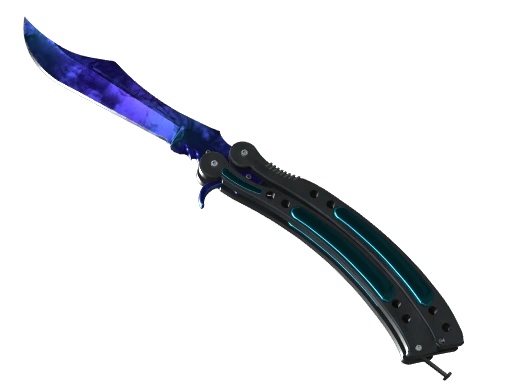
Butterfly Knife | Doppler Sapphire
- His copy
- Factory New
- Our checker, Oct 27
- $7,934.52
- From today
- $8,606.79
The most valuable item in his account. Sapphire is the deep blue Doppler phase, and our checker prices each phase separately.

Sport Gloves | Ultra Violent
- His copy
- Field-Tested
- Our checker, Oct 27
- $1,024.40
- From today
- $806.82
Sport Gloves from the Sealed Dead Hand Terminal, which Valve added in March 2026. The most valuable of his three pairs of gloves.
Want to see the rest? ZywOo’s full CS2 inventory lists his top ten, his Major trophies and what our checker does not count, and his live inventory shows today’s value.
FAQ
What sensitivity does ZywOo use in CS2?
ZywOo uses 400 DPI and 1.9 in-game sensitivity, which gives 760 eDPI. Until September 2026 he played on 2.0, or 800 eDPI. His zoom sensitivity is 1.
What resolution does ZywOo play on?
He plays 4:3 stretched in fullscreen on a 600 Hz ZOWIE monitor. A listing updated in October 2026 gives 1024x768, while earlier and some later listings give 1280x960; we could not confirm either from a match.
What is ZywOo's crosshair code?
His current code is the one you copy from the scoreboard in a recent Team Vitality match. Codes created before September 30, 2026 no longer import. His tracked crosshair is a small cyan static cross: length 2, thickness 2, gap 2, no dot, no outline.
What mouse does ZywOo use?
The Pulsar ZywOo The Chosen Mouse Gen.2, at 400 DPI and 1000 Hz, on the matching Pulsar ZywOo The Chosen Mousepad.
Was this article helpful?One tap. It tells us what to update first.
Be the first to rate this article.
Thanks, noted. Alex reads these before every update.