

On this page
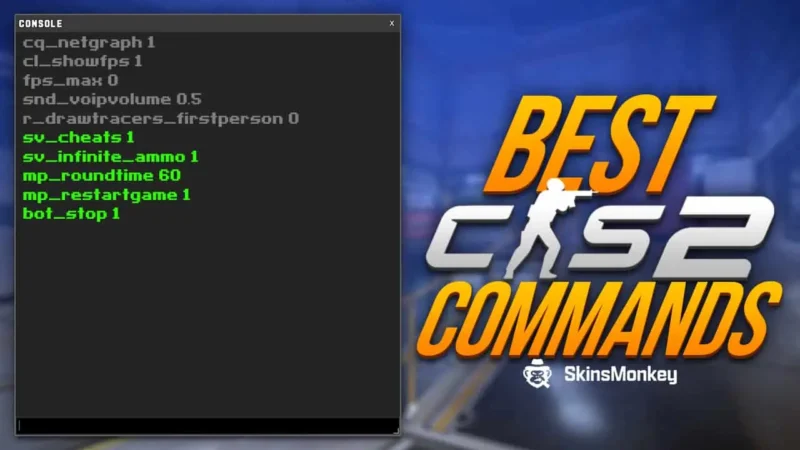
A CS2 practice config is a short .cfg file that turns an empty offline server into a training ground in one command. This guide gives you a ready config with 20 lines for grenade and aim practice, shows where to save it and how to load it with exec practice, and explains what every line does. It also covers the grenade, bot and movement commands worth binding to a key. For every other console command, from HUD to performance, see our full list of CS2 console commands.
The CS2 Practice Config to Copy
Copy the block below into a plain text file. Every line was checked against the Valve developer list of CS2 commands and public practice guides in November 2026.
sv_cheats 1
bot_kick
mp_warmup_end
mp_freezetime 0
mp_roundtime_defuse 60
mp_ignore_round_win_conditions 1
mp_respawn_on_death_t 1
mp_respawn_on_death_ct 1
mp_buy_anywhere 1
mp_buytime 9999
mp_maxmoney 60000
mp_startmoney 60000
sv_infinite_ammo 1
ammo_grenade_limit_total 5
sv_grenade_trajectory_prac_pipreview 1
sv_grenade_trajectory_prac_trailtime 4
sv_showimpacts 1
buddha 1
buddha_reset_hp 100
mp_restartgame 1
Two values are a matter of taste. Set the trail time higher if you want to study a lineup longer, and replace buddha 1 with god if you prefer to take no damage at all.
How to Install and Load the Practice Config
- Create the file Open Notepad, paste the config and save it as practice.cfg. Pick “All files” as the type so Windows does not save it as practice.cfg.txt.
- Put it in the cfg folder The default path is C:\Program Files (x86)\Steam\steamapps\common\Counter-Strike Global Offensive\game\csgo\cfg. If your Steam library sits on another drive, start from that library folder.
- Start an offline server Play, then Practice or a private match with bots, on the map you want to learn.
- Load it Open the console and type exec practice. The round restarts with every setting active.
- Reload after a map change A new map loads its own game mode settings, so run exec practice again.
If the console does not open, enable it first in Settings, Game, “Enable Developer Console”. Our CS2 commands guide shows the steps with the default key.
What Each Line of the Config Does
| Command | What it does |
|---|---|
sv_cheats 1 | Unlocks the practice commands on your own server |
bot_kick | Removes all bots |
mp_warmup_end | Ends the warm-up |
mp_freezetime 0 | No freeze time at round start |
mp_roundtime_defuse 60 | Rounds on bomb maps last 60 minutes |
mp_ignore_round_win_conditions 1 | The round never ends on its own |
mp_respawn_on_death_t 1 | You respawn after dying on the T side |
mp_respawn_on_death_ct 1 | You respawn after dying on the CT side |
mp_buy_anywhere 1 | Buy menu works anywhere on the map |
mp_buytime 9999 | Buy time that does not run out |
mp_maxmoney 60000 | Raises the money cap |
mp_startmoney 60000 | Starts you with the full amount |
sv_infinite_ammo 1 | Magazine never runs out |
ammo_grenade_limit_total 5 | Carry five grenades at once (default 4) |
sv_grenade_trajectory_prac_pipreview 1 | Shows where a grenade will land before you throw |
sv_grenade_trajectory_prac_trailtime 4 | Keeps the flight path on screen for 4 seconds |
sv_showimpacts 1 | Marks where each bullet lands |
buddha 1 | You cannot die |
buddha_reset_hp 100 | Health resets to 100 when it would hit zero |
mp_restartgame 1 | Restarts the round so every setting applies |
Grenade Practice Commands
Most players build a practice config for smokes, flashes and molotovs. These are the commands that make lineup practice fast.
sv_grenade_trajectory_prac_pipreview 1shows a small preview of where the grenade will land while you aim. It is the quickest way to check a lineup before you throw.sv_grenade_trajectory_prac_trailtime 4draws the flight path after the throw. Raise the number to keep it on screen longer.sv_rethrow_last_grenadethrows your last grenade again from the same spot and angle, so you can watch it land without walking back.ent_fire smokegrenade_projectile killremoves every smoke at once, andent_fire inferno killputs out molotov fire.ammo_grenade_limit_total 5lets you carry a full set of grenades instead of the default four.
Bot Commands for Aim and Retake Practice
bot_kickremoves all bots.bot_addadds one back.bot_placeputs a bot where you are aiming, so you can set up angles you want to clear.bot_stop 1freezes the bots in place. Set it back to 0 to let them move.bot_crouch 1makes the bots crouch, which trains you to aim at a lower head height.bot_mimic 1makes the bots copy your movement, a simple way to practice counter-strafing against a moving target.
Movement and Map Tools
nocliplets you fly through walls to reach a throwing spot quickly. Type it again to land.cl_showpos 1shows your position and angle at the top of the screen, useful for writing down an exact lineup.godmakes you invulnerable, a stronger version ofbuddha 1.give weapon_ak47gives you any weapon by its item name without the buy menu.mp_restartgame 1restarts the round, which also brings back broken glass and doors.
Binds That Save Time
Typing in the console between throws breaks your rhythm. Add these lines to the end of practice.cfg and every action is one key away.
bind "n" "noclip"
bind "j" "sv_rethrow_last_grenade"
bind "k" "ent_fire smokegrenade_projectile kill; ent_fire inferno kill"
Commands separated by a semicolon run together, so the last bind clears smokes and fire with one press. Pick keys you do not use in matches, because binds made in a config stay active until you change them.
Before You Load the Config
- It works offline only. sv_cheats and the server settings take effect on a server you host. On Valve matchmaking servers they do nothing.
- Running practice commands on your own server carries no ban risk. They are part of the game and do not touch game files.
- Keep a separate file for matches. If you change binds in practice.cfg, put your normal binds in another config so you can switch back.
Once your lineups are reliable, the next step is the setup the pros use. Our guide to CS2 pro settings and configs lists crosshairs, sensitivity and video settings from current players.
Bottom line
Save the config once, then load it with one command every time you practice.
The 20 lines above cover what a practice session needs: no round end, respawns, money, infinite ammo, grenade previews and bullet impacts. Bind noclip, the rethrow and the smoke clear to spare keys and you will spend the session throwing instead of typing.
For everything outside practice, from HUD to network settings, keep our full list of CS2 console commands at hand.
FAQ
How do I make a practice config in CS2?
Paste the practice commands into Notepad, save the file as practice.cfg in the game's cfg folder (Steam\steamapps\common\Counter-Strike Global Offensive\game\csgo\cfg) and type exec practice in the console on an offline server.
What is the command to see grenade trajectory in CS2?
sv_grenade_trajectory_prac_pipreview 1 shows where the grenade will land before you throw, and sv_grenade_trajectory_prac_trailtime 4 draws its flight path for 4 seconds after the throw. Both need sv_cheats 1.
How do I rethrow a grenade in CS2?
Type sv_rethrow_last_grenade in the console, or bind it to a key with bind "j" "sv_rethrow_last_grenade". The game throws your last grenade again from the same position and angle.
Do CS2 practice commands work on Valve servers?
No. sv_cheats and server settings such as infinite ammo or buy anywhere only work on a server you host, offline or private. Using them there carries no ban risk.
Was this article helpful?One tap. It tells us what to update first.
Thanks, noted. Alex reads these before every update.