

On this page
CS2 bot trading means swapping your skins with an automated Steam account run by a trading site, instead of with another player. This guide explains what a trade bot is, walks you through your first bot trade on SkinsMonkey in six steps, and covers Valve’s 7-day Trade Protection and the safety checks to make before you accept any offer. Steam rules come from Valve’s Steam Support pages. SkinsMonkey facts come from our own help center and terms.
Trading has been an important part of Counter-Strike ever since Valve introduced cosmetic items to CS:GO in 2013. The most common way to trade CS2 skins is still to find a fellow trader and strike a deal with them. Many players do not know that you can also trade skins with a bot, and for a quick swap it is often the simpler option.
What Is CS2 Skin Trading?
Skins (aka Finishes) first appeared in Counter-Strike with the Arms Deal update in 2013. A skin changes how a weapon, knife or pair of gloves looks. It does not change how the weapon plays. Players trade skins to refresh their inventory, to upgrade into a more expensive item, or to split one item into several cheaper ones.
The value of a skin depends on its collection, its rarity, StatTrak and its condition. Condition comes in five wear levels, from Factory New to Battle-Scarred, and the same skin usually costs more in Factory New than in Battle-Scarred. A trade, with a bot or a person, is an exchange of items at values both sides accept.
What Is a CS2 Trading Bot?
CS2 trading bots are programs that automatically trade CS2 skins with players. There is no actual gamer on the other side of the transaction, so there is no negotiation and no room for human error (unless committed by you).
The bot is a normal Steam account that holds the trading site’s inventory. The site puts a value on every item, on your side and on the bot’s side. You choose what to give and what to take, and the bot sends you a Steam trade offer with exactly those items. You confirm it in Steam, so every bot trade goes through Steam’s own trading system.
Why Trade Skins With a Bot Instead of a Player?
Fewer Ways to Get Scammed
A bot removes the “human factor” from one side of the deal. Nobody asks you to send first, nobody switches an item at the last second and nobody fakes a payment screenshot. Phishing sites and fake bots still exist, so the safety checks at the end of this guide still apply.
Set Prices
Every item has a value before you start, so you do not have to haggle. For a new trader this is the biggest help, because you can compare the offer with the item price on Steam and decide in a few seconds.
Quick Transactions
You do not have to search for a trading partner, agree on a deal and wait for them to come online. A bot trade usually takes about a minute from choosing the items to confirming the Steam offer.
Fees Inside the Price
Bot sites charge for the service through the item values. On SkinsMonkey the 10% fee is included in the item value quoted on the platform, so there is no separate charge at the end. Compare the value the site gives your skin with the price of the item you want, and you see the full cost of the trade.
For a site-by-site comparison of trade bots, read our complete guide to CS2 skin trading bots. If you are not sure whether you need a bot or a marketplace, our guide to bot trading vs P2P marketplaces explains the difference.
How to Do CS2 Bot Trading on SkinsMonkey: Your First Trade
All you need is a Steam account that is allowed to trade. These are the steps for a first trade.
- Get your Steam account ready. Steam requires $5 spent on your account before you can trade. Turn on the Steam Guard Mobile Authenticator in the Steam app, because that is where you confirm trades.
- Make your inventory public and copy your Trade URL. Our guide to the Steam Trade URL and inventory privacy shows where to find both.
- Log in with Steam. Use the Steam login button on SkinsMonkey. The login page is Steam’s own, on steamcommunity.com, so SkinsMonkey never sees your password.
- Enter your Steam Trade URL when SkinsMonkey asks for it, so the bots know where to send offers.
- Click “Trade Skins” and choose your items. Pick the CS2 skins you want to trade from your inventory, then pick what you want from the bots. They hold over 140,000 items.
- Click “Trade Items” and confirm in Steam. Open the offer in Steam, check every item and its wear, then confirm in the Steam Mobile app. The items arrive as soon as you confirm.
New users can enter the promo code MONKEY once for 5% of the trade value back, up to $5. If you add money to your balance, deposits get a 30% deposit bonus, or 35% with a creator’s code. The balance is for trading and cannot be withdrawn as cash. If you want money for a skin later, our sister service SkinCashier buys CS2 skins.
Questions about the process go to our 24/7 live chat or the help center.
Trade Protection: What Happens After the Trade
Since July 15, 2025, Valve protects every CS2 item received in a trade for 7 days. This applies to bot trades and to trades between players. Valve calls these items Trade Protected and marks them with a yellow shield in your inventory.
- You get the items at once and can equip them and play with them in-game.
- For 7 days a Trade Protected item cannot be consumed, modified or transferred, including into a Storage Unit. You cannot trade it on until the 7 days end.
- If you lose control of your account, you can reverse your trades from the last 7 days through your Steam Trade History page.
- A reversal returns all items from those trades to their previous owners. The account that reverses gets a 30-day trade and Community Market cooldown, and Steam Support cannot remove it.
For a first trade this means one thing: pick the skin you want to keep for at least a week. CS2 items are not subject to the old trade holds, so the trade itself is not delayed.
Is CS2 Bot Trading Safe and Legit?
Trading against a trading bot is just as legit as trading against a real player and won’t result in a VAC ban. VAC bans are for cheating, and a bot trade is a normal Steam trade offer. If you choose a reputable trading platform like SkinsMonkey.com and follow a few precautions, the trade is safe.
Most problems with bot trading come from fake copies of real sites and fake bot accounts. Check these five things before every trade:
- The site address is the one you typed or bookmarked, not a link from a DM or an ad.
- The Steam login page shows steamcommunity.com. A real site never asks for your Steam password on its own form.
- You never share your Steam Web API key. No trading site needs it to trade with you.
- You only accept offers you started yourself, and you check every item in the offer in Steam before you confirm.
- Your first trade is a cheap skin, so you see how the site works before you trade anything valuable.
Our guide on how to avoid CS2 scams covers API key scams, fake trade bots and phishing pages in more detail.
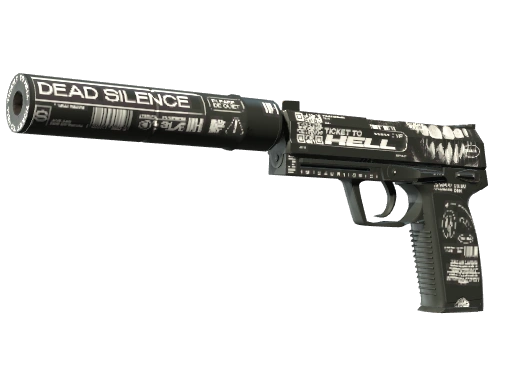
Three skins at three price levels


Bottom line
Make your first bot trade with a cheap skin, check the Steam offer and keep the new item for a week.
A bot trade is a normal Steam trade offer with fixed values on both sides, so there is no haggling and no stranger to trust. Log in only through Steam and never share your Steam Web API key.
On SkinsMonkey new users can use the MONKEY code once for up to $5 back, and deposits get a 30% bonus, or 35% with a creator's code. Items you receive stay Trade Protected for 7 days, so pick a skin you want to keep.
FAQ
What's the best CS2 bot trading site?
SkinsMonkey is the CS2 bot trading site we run, with instant trades through automated bots, Steam login that never asks for your password, and a 30% deposit bonus, or 35% with a creator's code. Our complete guide to CS2 skin trading bots compares it with other bot sites.
Is CS2 bot trading safe?
Trading with bots in CS2 can often be safer than trading with other players, as it removes many of the scams that rely on dealing with another person. Log in only through Steam, never share your API key and check every offer in Steam before you confirm it.
Can you get banned for trading with bots?
No. While using bots to play CS2 is a bannable offense, you can freely trade CS2 skins with bots, without risking a VAC ban for your account. Every bot trade goes through Steam's regular trade offer system, the same one used for trading with other players.
How long does a CS2 bot trade take?
Usually about a minute. You choose the items on the site, the bot sends a Steam trade offer and the items arrive as soon as you confirm it in the Steam Mobile app. After that, the items you received are Trade Protected for 7 days.
Can a bot trade be reversed?
Yes, within 7 days, like any CS2 trade since July 15, 2025. Valve lets you reverse recent trades if you lose control of your account. A reversal returns all items from your trades of the last 7 days and puts a 30-day trade and Market cooldown on your account.
Was this article helpful?One tap. It tells us what to update first.
Be the first to rate this article.
Thanks, noted. Alex reads these before every update.