

On this page
Counter-Strike 2 is an online game, so it’s only natural that players will want to chat with each other. Because of this, Valve has implemented a number of different communication channels, which players can use to stay in touch with their allies during a match.
With a high-speed game like CS2, where every second can greatly impact a match, players mostly utilize voice communication, which is easier to handle when both of your hands are in the game. However, this doesn’t make the normal text chat completely worthless. There’s a quick method to communicate with your teammates (and even the enemy team!) using the standard text chat. Here’s a quick guide on how to bind text in CS2.
Also, if you ever want to trade CS2 skins, you can check prices and trade instantly on SkinsMonkey.
What Are The CS2 Chat Binds?
CS2 chat binds are a quick and easy way to set up previously prepared chat lines, which you can send to your team chat, or all players in the match, with a single push of the button. Although this isn’t a practical way to send long or complex messages, chat bind commands are a great method to easily communicate simple messages and commands to other players. CS2 chat binds are also often used for banter, where players can quickly bind messages and spam them en masse whenever they score a kill or get killed themselves.
Can You Get Banned For Using CS2 Chat Bind Commands?
No, using chat binds in a CS2 match is perfectly legal and fine. Bans from the Valve Anti-Cheat system (known as VAC) are for cheating, such as using third-party programs or modifying the game files to gain an unfair advantage over other players. While chat binds allow you to quickly communicate important messages to your team, they don’t provide you with any type of advantage that could get you banned. CS2 features many different console commands, which can give you some general quality-of-life improvements. While a chat bind can help you play better by improving your communication, it doesn’t give you an unfair edge over other players.
How To Bind Text In CS2
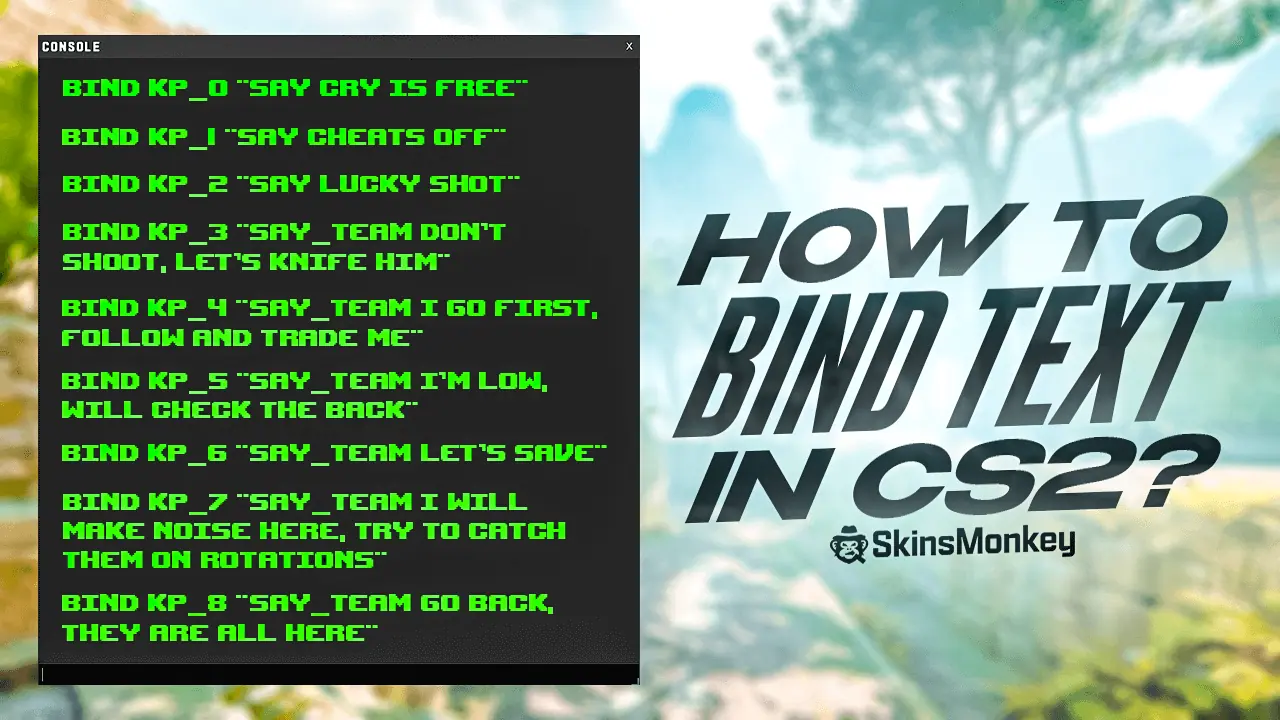
To use chat binds in CS2, you first have to know how to use console commands. After you enable the developer console, you can bring it up with the console button (tilde (~) by default) and start typing in your chat binds. Then, all you have to do is just type in the necessary commands. Thankfully, there’s only one console command that is used for message binds:
bind [key] “say [message]”
This allows you to bind any message to virtually any key or button that you have at hand. So for example, if you type the command bind k “say hello”, then every time you press K on your keyboard, you will automatically send a simple ‘hello’ message to all the players in the match.
While all-chat binds are useful for banter, you will most likely use the chat bind command to communicate with your teammates more efficiently by always having the most important callouts at hand. To make chat binds for your team chat, you can also use a single, easy command:
bind [key] “say_team [message]”
This console command works exactly the same as the binds for all chat, allowing you to quickly and efficiently communicate all the important messages to your allies. Communication and teamwork is the key to winning any CS2 match, and chat binds can help you better cooperate.
Do You Have To Type In The Chat Bind Commands Every Time You Start The Game?
The good news is you don’t have to bind chat commands every time you start the game. Re-typing even something simple, like a jump-throw bind command or a quick message bound to Alt, every time you start the game client gets tiring fast. Instead of having to do this, you can simply create an autoexec file for all your chat bind commands.
Autoexec files are one of the most useful features of CS2, particularly if you want to modify your game with useful chat commands. You can simply type in a few commands, or even a very long line, that you want to have executed every time you start the game and a CS2 autoexec file will run them for you, without you having to type anything. To make sure the file loads every time, add +exec autoexec.cfg to the game’s launch options in Steam.
To Sum Up
Chat bind commands can be extremely useful in high-level CS2, or even at lower ranks when you’re trying to improve. If you find it difficult to get through to your CS2 allies, try some chat bind commands and see if you get any improvement.
Was this article helpful?One tap. It tells us what to update first.
Be the first to rate this article.
Thanks, noted. Alex reads these before every update.