
On this page
Counter-Strike 2 is one of the biggest online games currently available, with an insane amount of weapon skins that players can get for their favorite guns. Besides guns, there are also knife skins, gloves, and many other visual items players have to keep track of.
Some of these items can be extremely valuable, with the rarest ones worth hundreds of thousands of dollars to interested collectors. This is why CS2 skin collectors put in a lot of effort to effectively sort and categorize their inventory for any potential traders.
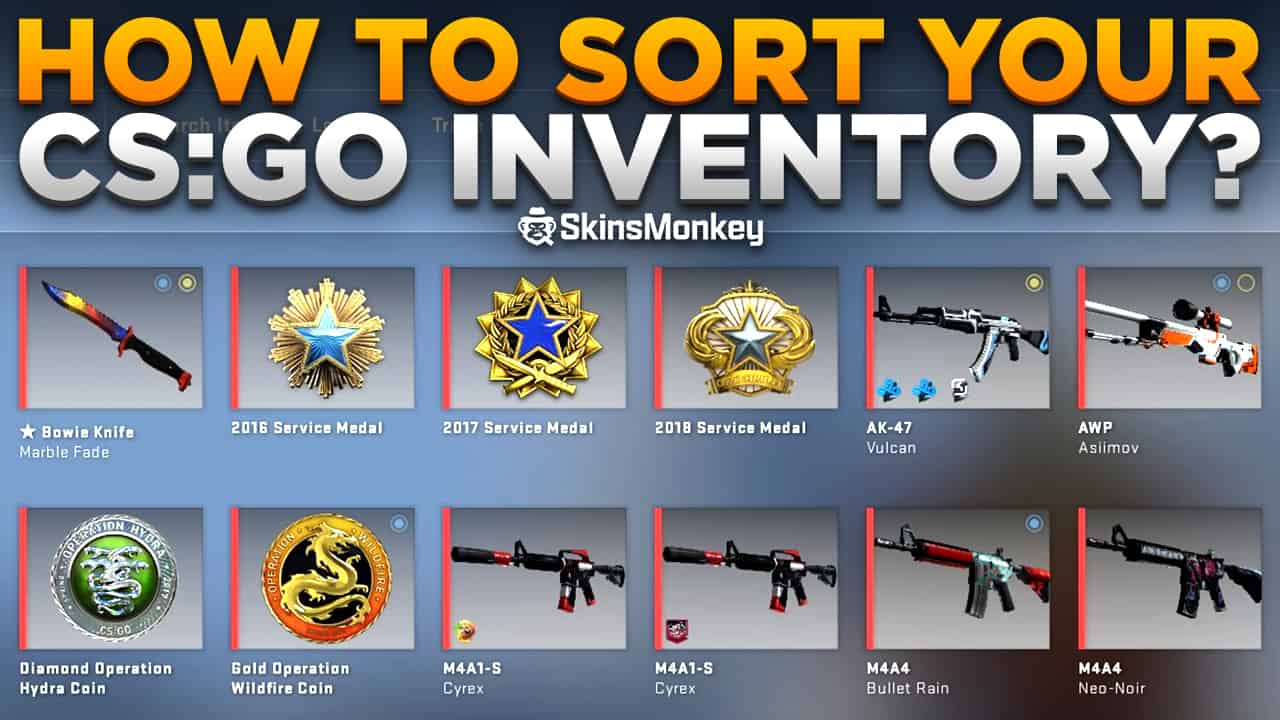
However, getting your CS2 inventory in order is actually much more difficult than it looks. That’s why we have prepared a guide on how to sort your CS2 inventory effectively.
Looking to trade CS2 skins? Be sure to first check out SkinsMonkey!
Why Should I Sort My Steam Inventory?
If you’re a standard Steam user, chances are you have never sorted, nor have you ever had a need to sort your CS2 inventory. Your Steam items are probably scattered all over your inventory, mixed and unsorted. While for most Steam users this is perfectly fine and they don’t need anything more, an organized Steam inventory can greatly help you when making trades and makes it easier for potential buyers to access the in-game items they want to buy, without having to search through your inventory by themselves.
While everyone can sort their Steam inventory, Steam’s default system for organizing your inventory cannot be changed. Because of this, sorting your CS2 inventory is generally based on gaming the way Steam’s organizing system works, so that it will display the items that you want in your chosen order. Sadly, while it’s nice to have your own dedicated inventory space, the locations Steam organizes items can’t be changed by the players. You can, however, rebuild your inventory in exactly whatever order you want your items to be sorted.
How To Sort CS2 Inventory
While it’s possible to sort your Steam inventory, players don’t do it often, since it can be quite difficult and take up a considerable amount of time and effort. The platform itself doesn’t offer any integrated features, which allow you to easily sort your in-game inventory, and instead requires you to use methods, which can circumvent the default sorting rules.
Before you go and sort your own inventory, it’s important to understand the way Steam records data and sorts all items in your inventory. Basically, Steam inventory records all data on every item, which includes:
- Whether it came from a case, dropped at the end of a match, whether it was a promotional item, etc.
- The exact time and date it was created by the server
- The skin’s trade history and its previous owners
- The float value and pattern index
- A custom name if the user has used a name tag
- Stickers that are attached to the weapon, their CS2 wear values, and their locations
Most importantly, Steam records the data on when the item was last modified, and in turn organizes your inventory, so that the items you modified first are on the bottom, and newer items are on the top. Modifying the item data includes things such as opening it in a weapon case, purchasing it on the Steam market or applying a name tag or a sticker. Thanks to this system, the items you haven’t used in a long time are on the further pages of your inventory, while any of the new drops are moved to the front.
As you can see, the system is made to work efficiently and allow you to quickly access all of the newest items in your game’s weapon skins inventory without having to dig around too much. However, you might be sitting on some rare skins that you don’t want to trade just yet, or simply have some important, valuable items that you obtained a long time ago. In this case, you’ll probably want to have these items displayed upfront.
Thankfully, there are a couple of methods that allow you to use the way the Steam platform uses to organize items to your advantage. Here is how to sort your CS2 inventory:
Steam Market Method
One of the simplest ways you can sort your inventory is by using the Steam market trick. Although it allows you to modify your inventory in a simple way without having to use the help of another player, the Steam market method carries some risk, since it requires you to list the item on the market, at least for a couple of seconds. If someone malicious knows about what you’re trying to do, they could simply snag your items and leave you empty-handed (though often with a nice amount of Steam Wallet funds).
Basically, this method involves modifying the item’s data by putting it up for sale on the Steam market, and immediately de-listing it. This will move the item to the top of your inventory, allowing you to effectively order the items in your inventory around. However, you have to keep in mind, that you can only move around tradable items this way. If you have any tradable items you want to sort in your inventory, simply list them way above the average Steam Community Market price, and de-list them from the market as soon as possible.
Want to swap your skins for something new? Check out SkinsMonkey, where you can sell CS2 skins from your inventory!
Name Tag / Sticker Method
While this method isn’t very effective for a large inventory with many valuable items, it is also the only way to efficiently move around untradable items. With this method, you simply use a name tag or a sticker to modify the item, which immediately moves it to the front of your inventory.
The obvious downside to this is that it can cost quite a lot to move many items around. Still, it provides you with a neat way to order untradable items, or StatTrak skins that you don’t want to lose your score on. Simply place a name tag or a sticker on your gun, and it will be moved to the front of your inventory.
Trading Items
Perhaps the easiest and safest way to organize your CS2 inventory is with the trading method. You need a trusted friend to help you with it, but many professional traders simply use dedicated trading Steam accounts to make this process easier and safer. While you can use a second account of your own as well, keep in mind, that in order to trade items on the new account you’ll still need to make a purchase of five or more dollars first.
In short, you trade your items to the other account, and they trade them back to you. This involves modifying the item’s data and immediately moving it to the top of your inventory. Still, this method requires you to have another account available, and can only be used to move any tradeable or marketable item. Also keep in mind that since July 2025, items received in a CS2 trade are Trade Protected for 7 days, so the other account can only send them back once that protection ends.
In Conclusion
As you can see, sorting a CS2 skin inventory is not an easy task. Although it can be quite time-demanding, it can also really improve all of your trading and is a great way to obtain better and more trade offers in the long run.
Was this article helpful?One tap. It tells us what to update first.
Be the first to rate this article.
Thanks, noted. Alex reads these before every update.